top of page

Working with Google Workspace Business Emails from Wix

Google Workspace Error Message: "You do not have access to Email"

If you see the below error message while trying to access your Google Workspace business email purchased from Wix, you need to make sure that your domain has been verified with Google and that the Gmail app is active.

Learn how to:

Verify Your Domain using a TXT Record

  1. Sign into your Google Admin Console.

  2. Click Domains.
    Note: (If hidden) Click More Controls at the bottom of your Admin console and select Domains.

  3. Click Manage Domains.

  4. Click Set up Admin Console next to the domain you would like to verify. 
    Note: If you domain isn't listed, click Add a Domain to add a new domain.

  5. Click Next and then Continue to choose TXT verification.

  6. Copy the TXT record.

  7. Add the TXT record to your domain's DNS records in the TXT Value field.

  8. Click Verify.
    Note: If you receive a message that your domain couldn't be verified, please wait at least 10 minutes and try again. It may take a few tries for your domain to be verified.

Enable Your Gmail App from the Google Admin Console

  1. Log into their Google Admin Console.

  2. Click on Apps.

  3. Click on Google Workspace.

  4. Select the Gmail app and click the ON button.
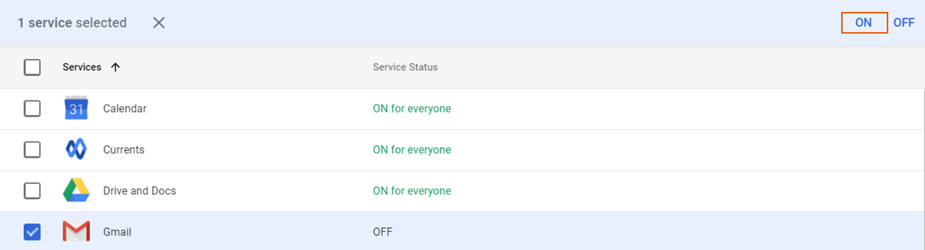
5.  Click Turn On in the dialog box to confirm.

Note:

Changes to Google Workspace apps can take up to 24 hours to propagate.

Need A Professional Website?
Contact Us 
Today!

Wix Stores: Setting Up Affiliate Marketing with the Goaffpro App

Wix Contacts: About Your Contact Panel

Wix Contacts: Using Pinned Actions in Your Contact Panel

Wix Contacts: Creating a Test Contact

Wix Contacts: Changing a Contact's Subscription Status

Wix Contacts: Adding and Managing Custom Contact Fields

Wix Contacts: Creating and Using Contact Labels

Wix Contacts: Creating a Segment

Wix Contacts: About Segments

Wix Contacts: Exporting Your Contacts

Wix Contacts: Troubleshooting Contact Importing Issues

Wix Contacts: Importing Contacts by Uploading a CSV File

Wix Contacts: Importing Contacts from a Gmail Account

Wix Contacts: Managing Your Contact List

Wix Contacts: Manually Adding a Contact

Wix Contacts: An Overview

Wix Forms: Creating a Coupon

Wix Forms: Setting Up Tax on Your Form

Wix Forms: The Difference between the New and Old Wix Forms

Wix Forms: Viewing Form Submissions from Your Dynamic Pages

Wix Forms: Managing Your Forms from the Dashboard

Wix Forms: Choosing an Address Field

Wix Forms: Adding and Setting Up a Donation Form

Wix Forms: Adding Submission Limits to Your Forms

Wix Forms: Adding and Managing Rules

Wix Forms: Upgrading Wix Forms

Wix Forms: Adding and Setting Up a Multi-Step Form

Wix Forms: Adding Payments to a Site Form

Wix Forms: Enabling Double Opt-In for Subscribers

Wix Forms: Adding and Setting Up a Subscribe Form

wix experts
Graphic2Traffic web design
©
bottom of page